Month-End Close Checklist for Small Businesses
October 27, 2026 · Aditya Gupta

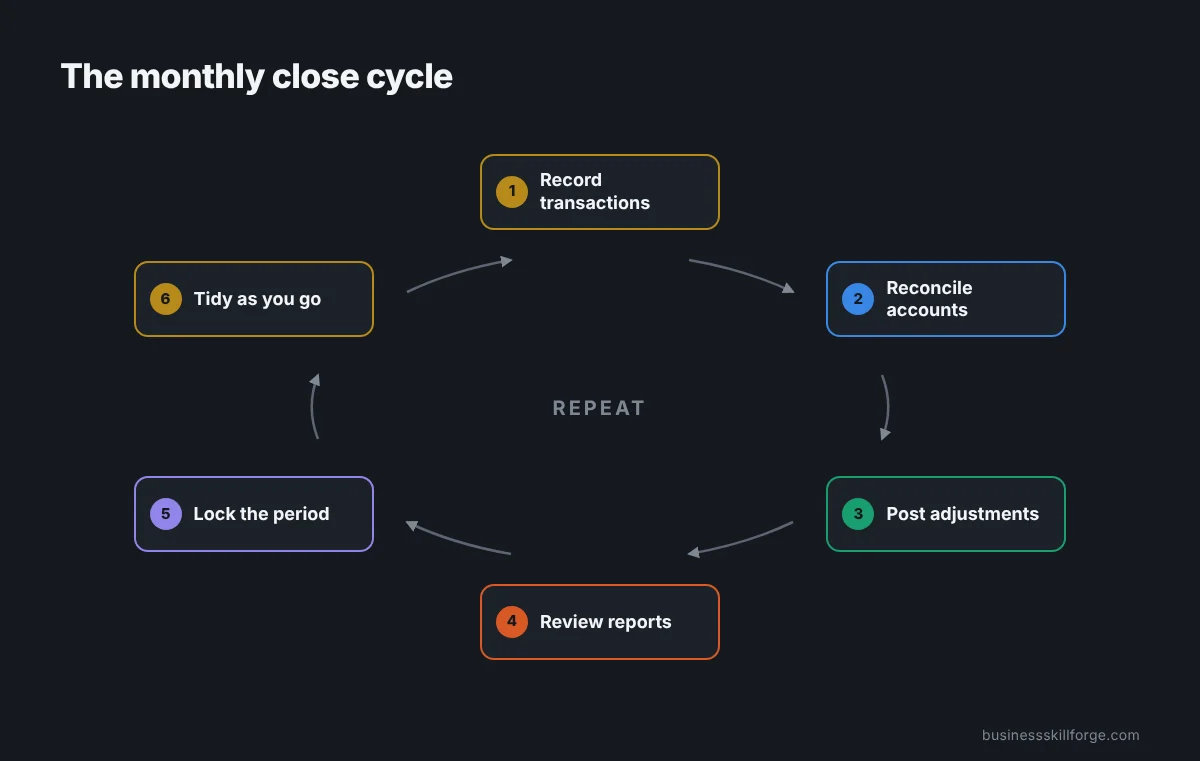
A month-end close checklist is the fixed list of tasks you complete after each month ends so your books are accurate before anyone reads the numbers. For a small business it comes down to recording every transaction, reconciling every bank and card account, posting adjusting entries such as accruals and depreciation, reviewing the reports, and locking the period so nothing changes afterward.
Without a close, your profit and loss report is a draft that keeps changing as late bills arrive and transactions get recategorized. With one, you get numbers you can make decisions on, compare month to month, and hand to a lender or tax preparer without a week of cleanup. The checklist below is built for a business with one bookkeeper or an owner who does the books, not a finance department.
What is a month-end close?
The month-end close is the process of finalizing a month’s accounting records so the financial statements for that month are complete and correct. Once a month is closed, it’s locked: later changes go into the current month as corrections rather than quietly rewriting history.
Closing does three jobs. It makes sure nothing is missing (every sale, bill and bank line is in). It makes sure everything is in the right period (January’s costs show up in January, even if paid in February). And it gives someone a moment to look at the results and ask whether they make sense.
How long should a month-end close take?
For a small business with clean habits during the month, five business days is a reasonable target, and many single-entity businesses with a few hundred transactions get it done in two or three. The time goes up sharply when receipts are missing, bank feeds haven’t been reviewed for weeks, or nobody knows what last month’s odd $4,000 payment was.
Speed comes from doing work during the month, not from rushing at the end. Categorizing bank transactions weekly and filing receipts as they come in can turn a five-day close into a two-day one.
The month-end close checklist
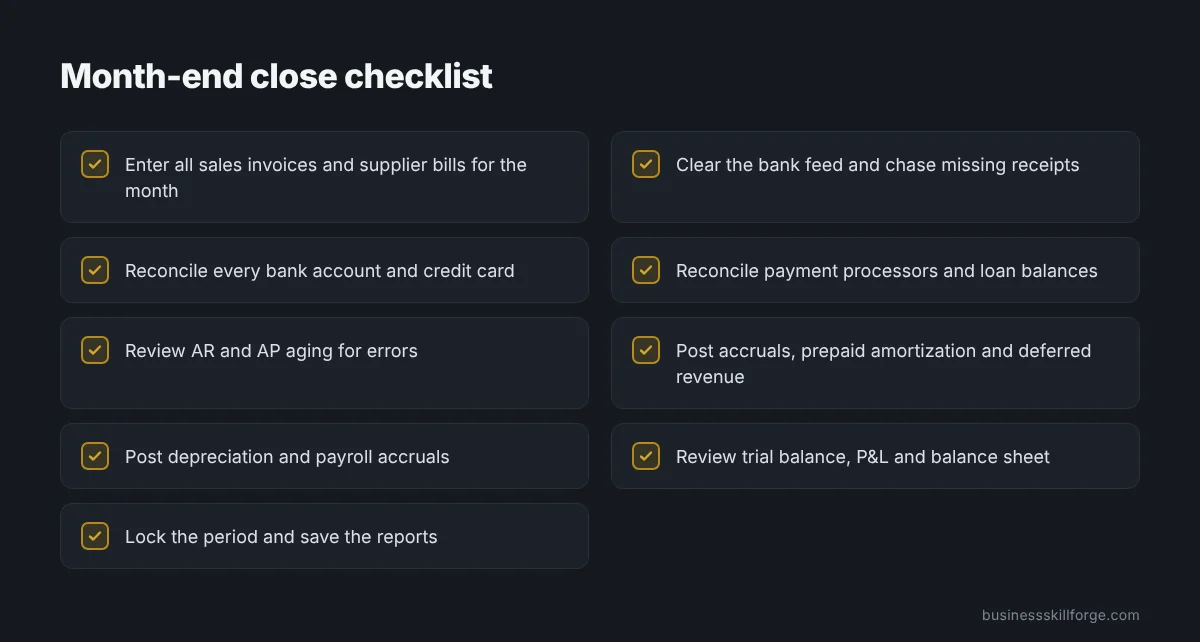
Here is the full list, grouped into a five-day schedule. Adjust the days to fit, but keep the order. Reconciliations come before adjustments, and review comes last.
| Day | Tasks |
|---|---|
| Day 1 | Enter all sales invoices and supplier bills dated in the month. Clear the bank feed. Chase missing receipts. |
| Day 2 | Reconcile every bank account, credit card, loan account and payment processor to its statement. |
| Day 3 | Review AR and AP aging. Post accruals, prepaid expense amortization, deferred revenue releases, depreciation and payroll accruals. |
| Day 4 | Run the trial balance, P&L and balance sheet. Compare to last month and budget. Investigate anything odd. |
| Day 5 | Owner review, final corrections, lock the period, save reports. |
Each step explained
1. Record every transaction
Every sales invoice, supplier bill, expense receipt and bank transaction dated in the month should be in the books. Look in your inbox for bills that arrived but were never entered, and check your invoicing tool against revenue in the ledger. If you use a separate tool for invoicing or payroll, confirm its totals match what landed in your accounting system.
2. Reconcile bank, card and processor accounts
Reconcile each account to its statement, following the method in our step-by-step bank reconciliation guide. The IRS recordkeeping guide for small businesses, Publication 583, recommends reconciling your checking account each month. Include business credit cards, loan balances (compare to the lender’s statement) and payment processors such as Stripe, Square or PayPal.
3. Review receivables and payables
Run the AR aging report and check that every open invoice is genuinely unpaid. Payments sometimes get recorded as deposits without being applied to the invoice, which leaves both an inflated AR balance and inflated revenue. Do the same for AP: is every open bill really unpaid?
4. Post adjusting entries
These entries are what separate accrual books from a tidied-up bank statement. The usual adjustments for a small business:
- Accrued expenses. An accrued expense is a cost incurred this month that hasn’t been billed yet, such as a contractor’s hours or utilities.
- Prepaid expenses. A prepaid expense is a payment for future months, such as annual insurance or software. Move it to the balance sheet and expense one month at a time.
- Deferred revenue. Customer payments for work you haven’t done yet belong in a liability until delivered.
- Accrued revenue. Work done this month but invoiced next month.
- Depreciation. The monthly share of the cost of equipment, vehicles and computers.
- Payroll accruals. Wages earned in the last days of the month but paid next month.
5. Review the reports
Run the trial balance first, then the P&L and balance sheet. Compare each line to last month and, if you have one, the budget. You’re looking for things that don’t make sense, which is covered in more detail below.
6. Lock the period
Most accounting software lets you set a closing date and require a password to change anything before it. Use it. Then save PDF copies of the P&L, balance sheet and reconciliations in a folder for the month.
Worked example: adjusting entries at a design studio
Northlight Studio is a six-person design agency. At the end of January, before any adjustments, its P&L shows a net profit of $18,400. Here’s what the close turns up.
| Adjustment | Entry | Effect on profit |
|---|---|---|
| Freelance illustrator’s January work, invoiced Feb 6 | Dr Contractor expense / Cr Accrued expenses | −$2,800 |
| Annual software plan of $3,600 paid and expensed in January; only one month belongs to January | Dr Prepaid expenses / Cr Software expense ($3,300) | +$3,300 |
| Depreciation on $24,000 of computers over 4 years | Dr Depreciation expense / Cr Accumulated depreciation | −$500 |
| January retainer hours, invoiced Feb 2 | Dr Accrued revenue / Cr Service revenue | +$4,200 |
| Client prepayment for a February project, booked as January revenue | Dr Service revenue / Cr Deferred revenue | −$6,000 |
| Wages for Jan 29–31, paid in February | Dr Wages expense / Cr Accrued payroll | −$2,100 |
| Net change | −$3,900 |
Adjusted net profit is $18,400 − $3,900 = $14,500. None of these entries moves cash. Every one of them moves profit into the month where the work actually happened.
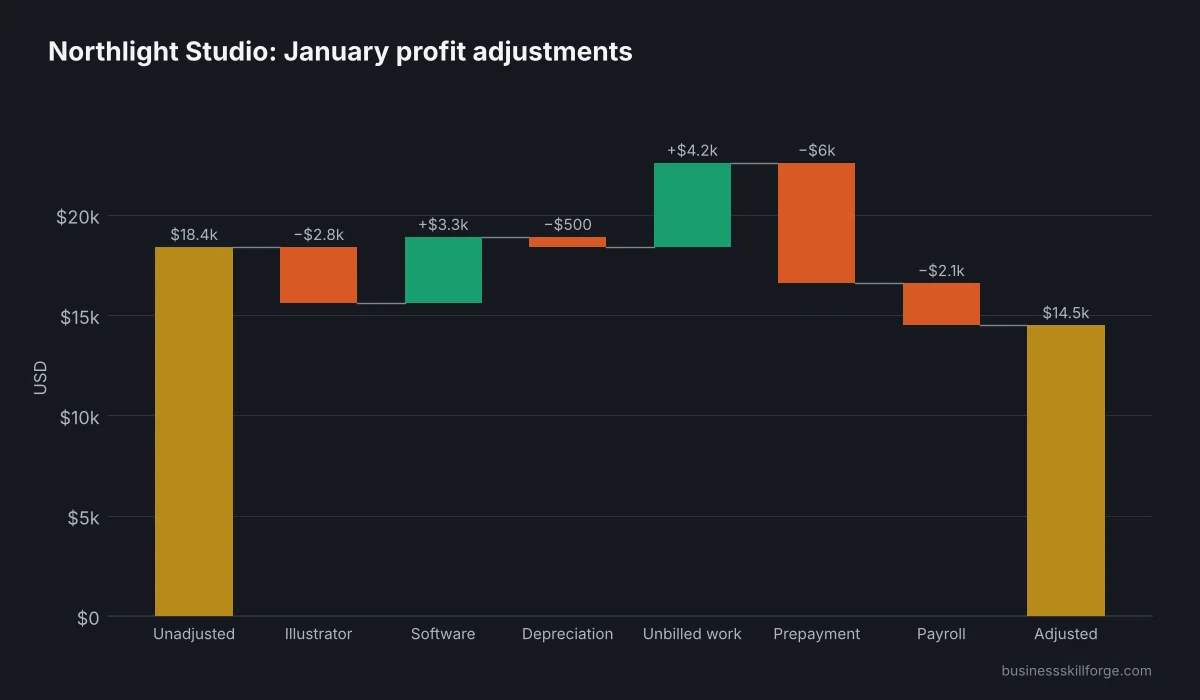
The adjustments that cut profit (the illustrator, the client prepayment, the wages) are the ones owners tend to miss, because they make the month look better when left out. A business that skips them consistently will overstate profit in busy months and get a nasty surprise later.
Reviewing the numbers: what to look for
Review is the step most often skipped and the one that catches the most. You don’t need advanced analysis. Put this month next to the previous few and ask why anything moved.
At Northlight, software expense ran between $1,850 and $1,950 a month from August to December, then jumped to $5,350 in January before adjustments. The jump is the $3,600 annual plan expensed in one go. After moving $3,300 to prepaid expenses, January’s software cost is $2,050, close to the previous five months.

A short review list:
- Any expense line that moved more than about 20% from last month without an obvious reason.
- Negative balances where there shouldn’t be any: a negative AR, a negative expense line, a liability with a debit balance.
- Large amounts sitting in suspense, uncategorized or “ask my accountant” accounts.
- Gross margin that jumped or fell sharply. That usually means a cost landed in the wrong month or the wrong account.
- Balance sheet accounts that never change. A prepaid balance that stays the same every month means nobody is amortizing it.
For a more structured version, our guide to budget vs actual variance analysis shows how to explain each difference in a sentence.
A shorter close for cash-basis businesses
If your books are on a cash basis, you can skip accruals, prepaid amortization and deferred revenue, because the cash method records income and expenses when money moves. The close still matters, though. You still need to enter every transaction, reconcile every account, review the P&L for miscategorized items and lock the period. For many freelancers and very small businesses, that’s a one-hour job once the habit is in place.
Common month-end close mistakes
- Reviewing the P&L before reconciling. If the bank isn’t reconciled, the P&L might be missing transactions or counting some twice.
- Leaving the period open. Someone recategorizes a January expense in April, and January’s reported numbers no longer match what was sent to the bank.
- Expensing annual costs in one month. Insurance, software and memberships paid annually distort the month they’re paid in.
- Ignoring the balance sheet. Most errors show up on the balance sheet first: an old balance in a clearing account, an AR balance that doesn’t match the aging report.
- No written checklist. A close that lives in someone’s head gets done differently every month, and not at all when that person is on vacation.
What to do next
Copy the five-day table above into a spreadsheet or task app, with one row per task and a column for the date done and who did it. Our templates library is a good place to start if you’d rather not build it from scratch. Run it for the month that just ended, even if it takes longer than five days the first time. Note what slowed you down, and fix that habit during the next month. By the third close, most of the time will have gone into review rather than catch-up.
Key takeaways
- A month-end close finalizes the month’s books so the reports are complete, in the right period and locked against later changes.
- The order matters: record everything, reconcile, post adjustments, review, then lock.
- Adjusting entries for accruals, prepayments, deferred revenue, depreciation and payroll shift profit into the right month without moving any cash.
- Comparing each line to the previous months is the quickest way to spot miscategorized or missing items.
- Cash-basis businesses can run a shorter close, but still need to reconcile and review every month.
Frequently asked questions
What is included in a month-end close?
A month-end close includes entering every transaction for the month, reconciling bank, credit card, loan and payment processor accounts, reviewing receivables and payables, posting adjusting entries such as accruals, prepaid expenses and depreciation, reviewing the financial statements for errors, and locking the period. The aim is a set of monthly reports that are complete, correct and won’t change later.
How many days should a month-end close take for a small business?
There’s no official standard, but five business days is a reasonable target for most small businesses, and many with simple books close in two or three days. The biggest factor is how much work is done during the month. Reviewing bank transactions weekly and filing receipts as they arrive does more for speed than any end-of-month shortcut.
What are adjusting entries at month-end?
Adjusting entries are journal entries posted at the end of a period to record income and expenses in the month they belong to. Common examples are accrued expenses for bills not yet received, prepaid expenses spread over several months, deferred revenue for work not yet delivered, depreciation, and wages earned but not yet paid. They change profit but don’t move cash.
Do I need a month-end close if I use cash-basis accounting?
Yes, but it’s shorter. Cash-basis books don’t need accruals, prepaid amortization or deferred revenue entries. You still need to make sure every transaction is entered and categorized, reconcile every bank and card account to its statement, review the P&L for anything odd and lock the period. Without that, cash-basis reports can be just as wrong as accrual ones.
What does it mean to lock or close a period?
Locking a period means setting a closing date in your accounting software so transactions on or before that date can’t be added, edited or deleted without a password or override. It protects reports you’ve already used or shared. If you find an error later, you correct it in the current open month rather than changing the closed one.
Sources
This article is general education, not tax, legal, accounting or investment advice. Rules and thresholds differ by country and change over time, so check the specifics for your situation. See our financial disclaimer.
Get practical finance & accounting tips in your inbox
Join US professionals getting our best guides, templates and tools. Free. Unsubscribe anytime.