How to Do a Bank Reconciliation, Step by Step
October 25, 2026 · Aditya Gupta

A bank reconciliation compares the cash balance in your books with the balance on your bank statement and explains every difference between them. You adjust the bank side for timing items like uncleared checks, adjust the book side for things only the bank knew about, like fees, and both adjusted balances should end up the same. If they match, your cash figure is right.
It’s the most basic check in bookkeeping, and also the one most often skipped. The IRS guide for small businesses, Publication 583, says plainly that you should reconcile your checking account each month. A reconciliation catches bank errors, missed transactions, duplicate entries and, occasionally, fraud. Below is the full process with a worked example where every number adds up.
What a bank reconciliation actually checks
A bank reconciliation is a schedule that ties the ending balance on a bank statement to the cash account in your general ledger for the same date. The two numbers almost never match on their own, for two kinds of reasons.
- Timing differences. You wrote a check on March 29 and recorded it. The supplier didn’t deposit it until April 3. Your books are right; the bank just hasn’t caught up.
- Items you haven’t recorded. The bank charged a fee, paid interest or returned a customer’s check. The bank is right; your books haven’t caught up.
A third category is plain errors: a figure typed wrong, a transaction entered twice, a payment posted to the wrong bank account. The reconciliation exposes these too.
What you need before you start
Gather everything for one account and one statement period. Reconcile each bank account and each credit card separately; combining them makes errors impossible to trace.
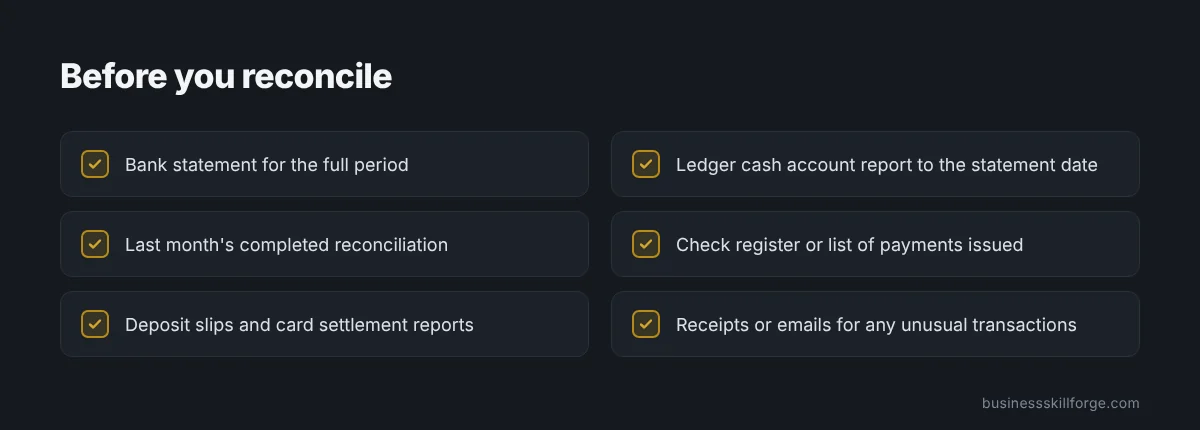
The most useful item on that list is last month’s completed reconciliation. Anything that was outstanding then should either have cleared this month or still be outstanding. A check that has been outstanding for four months deserves a phone call.
How to do a bank reconciliation, step by step
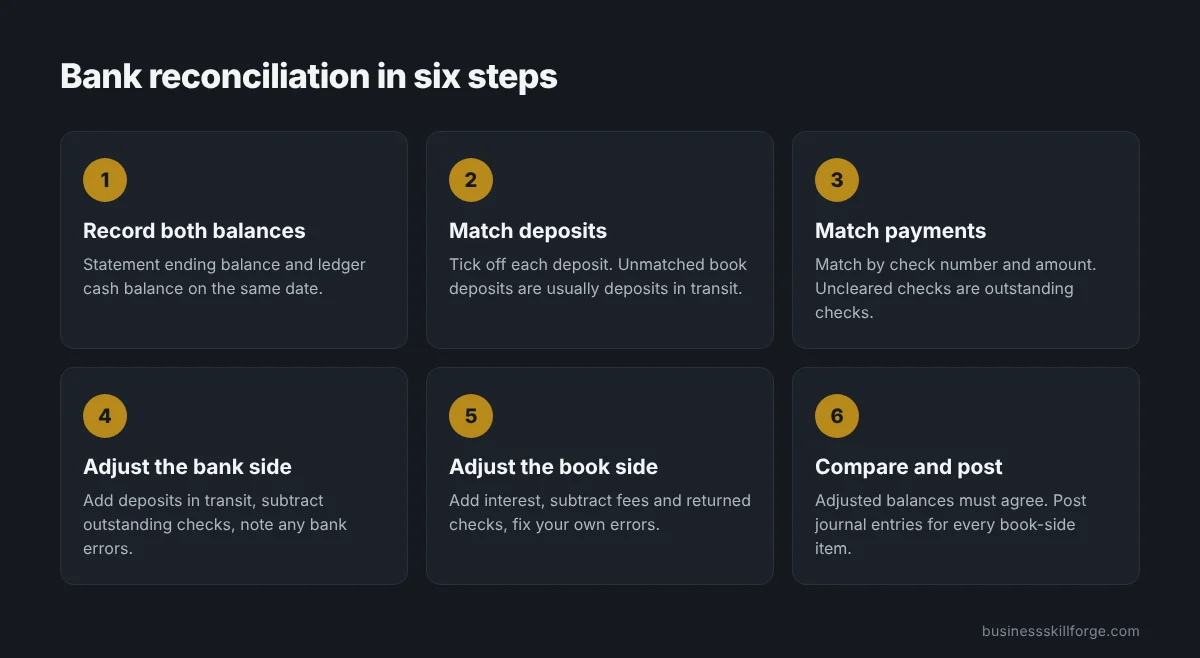
1. Start with both ending balances
Write down the ending balance on the bank statement and the cash balance in your ledger on the same date. Don’t use today’s balance from online banking; use the statement date.
2. Match deposits
Tick off each deposit in your books against the statement. Deposits in your books that aren’t on the statement are usually deposits in transit, money you deposited after the bank’s cutoff. Deposits on the statement that aren’t in your books need investigating: a customer payment you never recorded, a refund, a transfer.
3. Match withdrawals and checks
Do the same for payments. Match by check number and amount, not amount alone, since two $500 payments are easy to confuse. Checks you’ve recorded that haven’t cleared are outstanding checks.
4. Adjust the bank balance
Adjusted bank balance = statement balance + deposits in transit − outstanding checks (plus or minus any bank errors, which you report to the bank).
5. Adjust the book balance
Adjusted book balance = ledger balance + interest and unrecorded deposits − fees, returned checks and unrecorded payments, plus or minus your own errors.
6. Compare, then post the book-side entries
If the two adjusted balances agree, record journal entries for every book-side item. Bank-side items need no entry, because your books already have them right. Save the reconciliation report with the statement.
Worked example: a café’s March reconciliation
Harbor Street Café closes March with $18,420 on its bank statement and $16,974 in its ledger cash account, a $1,446 difference. Here’s what the matching turned up.
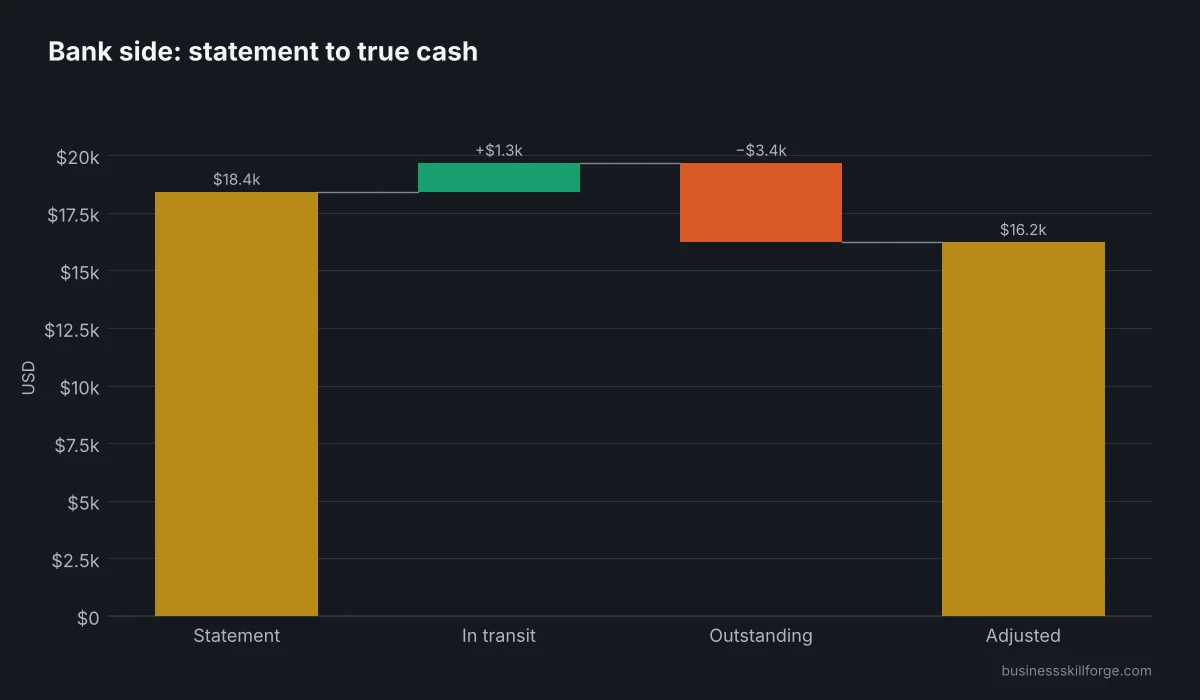
Bank side
| Item | Amount |
|---|---|
| Balance per bank statement, March 31 | $18,420 |
| Add: cash deposit made after cutoff on March 31 (deposit in transit) | +$1,260 |
| Less: outstanding check #1042 (produce supplier) | −$2,150 |
| Less: outstanding check #1045 (window cleaning) | −$380 |
| Less: outstanding check #1046 (equipment service) | −$915 |
| Adjusted bank balance | $16,235 |
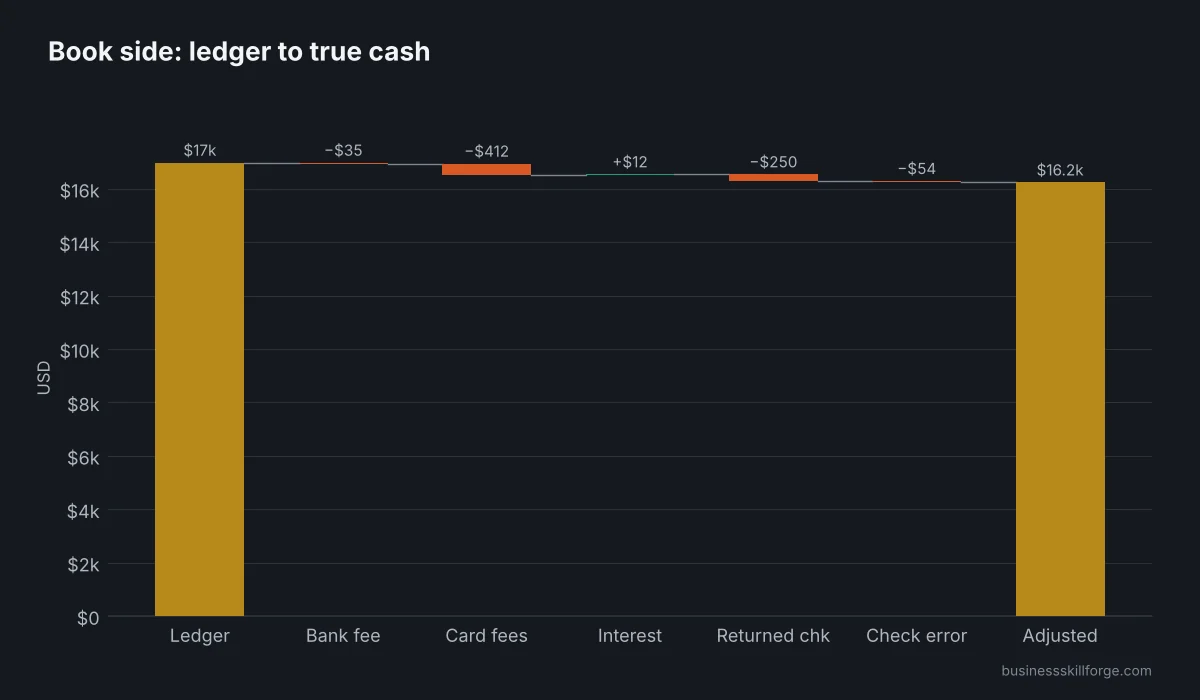
Book side
| Item | Amount |
|---|---|
| Balance per ledger, March 31 | $16,974 |
| Less: monthly account fee | −$35 |
| Less: card processing fees deducted by the bank | −$412 |
| Add: interest earned | +$12 |
| Less: catering client’s check returned unpaid | −$250 |
| Less: check #1039 for supplies recorded as $428, cleared at $482 | −$54 |
| Adjusted book balance | $16,235 |
Both sides land on $16,235, so the café’s true cash at March 31 is $16,235. The ledger was overstated by $739, and the statement was higher than true cash by $2,185 because three checks hadn’t cleared and one deposit hadn’t arrived.
The entries to post
| Entry | Debit | Credit | Amount |
|---|---|---|---|
| Bank fee | Bank charges | Cash | $35 |
| Card processing fees | Merchant fees | Cash | $412 |
| Interest | Cash | Interest income | $12 |
| Returned check | Accounts receivable | Cash | $250 |
| Check #1039 correction | Supplies expense | Cash | $54 |
The returned check goes back to accounts receivable because the client still owes the money. For now that makes it a collection job rather than a bad debt.
Notice how the two sides explain the original gap. The statement was $2,185 above true cash (the $3,445 of uncleared checks minus the $1,260 deposit in transit), and the ledger was $739 above true cash. The difference between those, $2,185 minus $739, is exactly the $1,446 the café started with. When your own numbers tie out like this, you can be confident nothing is hiding in the gap.
Outstanding checks, deposits in transit and bank-only items
Knowing which side an item goes on is half the skill. A simple rule: if your books already have it, adjust the bank side. If only the bank has it, adjust the book side.
| Item | Already in your books? | Already at the bank? | Adjust which side | Journal entry needed? |
|---|---|---|---|---|
| Deposit in transit | Yes | No | Bank: add | No |
| Outstanding check | Yes | No | Bank: subtract | No |
| Bank fee or card fee | No | Yes | Book: subtract | Yes |
| Interest earned | No | Yes | Book: add | Yes |
| Returned (NSF) check | No | Yes | Book: subtract | Yes |
| Your recording error | Wrong | Right | Book: correct | Yes |
| Bank error | Right | Wrong | Bank: correct | No, contact the bank |
What to do when it doesn’t balance
Sooner or later you’ll finish the matching and still be off by some odd amount. Before you start from scratch, try these checks in order.
- Search for the exact difference. If you’re off by $187.50, look for a $187.50 transaction you missed or duplicated.
- Halve it. If something was entered on the wrong side (a deposit recorded as a payment), the difference is twice the amount. Off by $375? Look for a $187.50 item.
- Divide it by 9. If the difference divides evenly by 9, suspect a transposition, two digits swapped. The café’s $54 error ($482 entered as $428) divides by 9 exactly.
- Check the starting point. If last month’s reconciled balance has changed, someone edited or deleted a transaction in a closed period.
- Check the dates. A transaction dated April 1 in your books but March 31 at the bank lands in different periods.
If you still can’t find it, don’t post a plug entry to make it balance and move on. A small unexplained difference this month is often a symptom of a larger one next month.
Reconciling in software vs a spreadsheet
Most small businesses now reconcile inside their accounting software. The bank feed imports transactions daily, you match or categorize each one, and the reconcile screen asks for the statement’s ending balance and date. You tick the cleared items until the difference shows zero, then save. The steps are exactly the ones above; the software just does the arithmetic and keeps the report.
Bank feeds create a specific trap, though. When you categorize a feed transaction directly as an expense, and someone has also entered the same bill and payment manually, the payment ends up in your books twice. The reconciliation may still balance if you tick the wrong items, so check that every bill you’ve marked as paid is matched to one bank line and only one.
A spreadsheet works fine for a business with one account and a few dozen transactions a month. Put the bank export in one tab and your ledger export in another, add a column that flags matches by date, amount and reference, and filter for the unmatched rows. Those unmatched rows are your reconciling items. Keep the layout identical every month so last month’s outstanding items carry forward without retyping.
Card and payment processor accounts
Card processors and platforms like Stripe or PayPal usually pay out a net figure: a day’s sales minus fees and refunds, landing in the bank as one deposit. If you record sales gross, a single bank deposit won’t match any one sale. Reconcile the processor’s payout report first, so you know which sales, fees and refunds make up each deposit, then match the payout total to the bank. Our walkthrough on reconciling Stripe payouts covers this in detail.
Common bank reconciliation mistakes
- Reconciling to the online balance instead of the statement. The live balance changes daily; the statement doesn’t.
- Clicking “match” on suggested transactions without reading them. Bank feeds in accounting software suggest matches by amount. Two $1,200 payments to different suppliers will happily match the wrong way round.
- Letting old outstanding items pile up. A check outstanding for six months may have been lost in the mail or never cashed. Contact the payee, and void and reissue it if needed, so your books don’t carry a payment that will never happen.
- Skipping months. Reconciling twelve months in one sitting is far harder than twelve reconciliations of one month each, because errors compound.
- Having the same person record, pay and reconcile. Where possible, someone other than the person who writes checks should review the reconciliation. It’s one of the simplest internal controls a small business can have.
What to do next
Pick your main operating account and reconcile last month today, using the six steps above. Save the report and the statement together in a folder named by month. Then make it part of your month-end close checklist so it happens every month before you look at the P&L. If your bank exports are messy, our guide to cleaning bank and accounting exports in Excel makes the matching step much faster.
Key takeaways
- A bank reconciliation proves that the cash in your books matches the cash in your bank account once timing differences are explained.
- Deposits in transit and outstanding checks adjust the bank side and need no journal entry.
- Fees, interest, returned checks and your own errors adjust the book side and must be posted as journal entries.
- Both adjusted balances must agree exactly; a plug entry hides problems instead of solving them.
- Reconcile every account monthly, including credit cards, and keep each completed report with its statement.
Frequently asked questions
How often should I do a bank reconciliation?
At least monthly, as soon as the statement is available. The IRS small-business recordkeeping guide recommends reconciling your checking account each month. Businesses with a lot of transactions, or that have had problems with fraud or cash shortfalls, often reconcile weekly. The shorter the period, the easier it is to find a difference while you still remember the transactions.
Do outstanding checks need a journal entry?
No. An outstanding check is already recorded in your books; the bank just hasn’t processed it yet. You list it on the bank side of the reconciliation to explain the difference. Only items that the bank has recorded but you haven’t, such as fees, interest and returned checks, need journal entries in your books.
What happens if my bank reconciliation doesn't balance?
Look for the exact difference first, then half the difference (an item posted on the wrong side), then check whether it divides by 9 (a transposition error). Confirm last month’s reconciled balance hasn’t changed and that transactions near month-end are dated correctly. Avoid posting a plug entry; unexplained differences tend to grow.
Does accounting software reconcile automatically?
Bank feeds in software such as QuickBooks or Xero import transactions and suggest matches, which saves time. They don’t guarantee accuracy. Suggested matches can pair the wrong transactions, duplicates can slip in, and the software can’t know about a check you wrote but never entered. You still need to compare the ending balances and review what was matched.
Should I reconcile credit card accounts too?
Yes. A business credit card is a liability account, and its statement should be reconciled to your books every month the same way as a bank account. Card accounts are where personal charges, duplicate subscriptions and missing receipts tend to hide, so reconciling them catches problems that a bank reconciliation alone won’t.
Sources
This article is general education, not tax, legal, accounting or investment advice. Rules and thresholds differ by country and change over time, so check the specifics for your situation. See our financial disclaimer.
Get practical finance & accounting tips in your inbox
Join US professionals getting our best guides, templates and tools. Free. Unsubscribe anytime.