Internal Rate of Return (IRR) Explained, With Its Traps
October 28, 2026 · Aditya Gupta

The internal rate of return (IRR) is the annual return an investment earns, worked out from its cash flows. Technically, it’s the discount rate at which the investment’s net present value is exactly zero. If the IRR is higher than your required return, the investment clears the bar. IRR is popular because it’s a single percentage, but it has traps that can mislead you.
Those traps are the reason this guide exists. IRR works well for a simple, one-off investment with money out up front and money back later. It works less well when you’re comparing projects of different sizes, when cash flows flip between positive and negative, or when a project is very short. Below is the calculation with a worked example, then each trap with numbers.
What IRR actually measures
IRR is the discount rate that makes the present value of an investment’s future cash flows equal to its cost. Put differently, it’s the interest rate a bank account would need to pay to give you exactly the same cash flows as the investment.
IRR is the flip side of net present value. NPV asks: at my chosen discount rate, how many dollars of value does this create? IRR asks: at what discount rate would this create zero value? Microsoft’s documentation for the Excel function describes it the same way: IRR is the rate at which NPV equals zero.
The decision rule: accept an investment if its IRR is higher than your hurdle rate, the minimum return you require given your cost of capital and the project’s risk.
Setting the hurdle rate is a judgment call, but it shouldn’t be a guess. Start with what the money costs you. If the landscaping company below would finance equipment with a 9% loan, its hurdle can’t sensibly be lower than 9%. Then add a margin for risk and for estimation error, because forecasts of extra jobs are rarely as reliable as a loan statement. Many owners land on a single figure, such as 10% for replacing existing equipment and 15% for anything that depends on winning new work, and apply it to every decision so projects are judged on the same terms.
How to calculate IRR: a worked example
A three-crew landscaping company is thinking about buying a $60,000 mini excavator. Right now it rents one for bigger jobs and turns down some drainage and grading work. The owner estimates that owning the machine adds $18,000 a year of net cash flow (extra jobs plus rental savings, minus fuel, maintenance and insurance) for five years, after which it’ll be worn out.
| Year | 0 | 1 | 2 | 3 | 4 | 5 |
|---|---|---|---|---|---|---|
| Cash flow | −$60,000 | $18,000 | $18,000 | $18,000 | $18,000 | $18,000 |
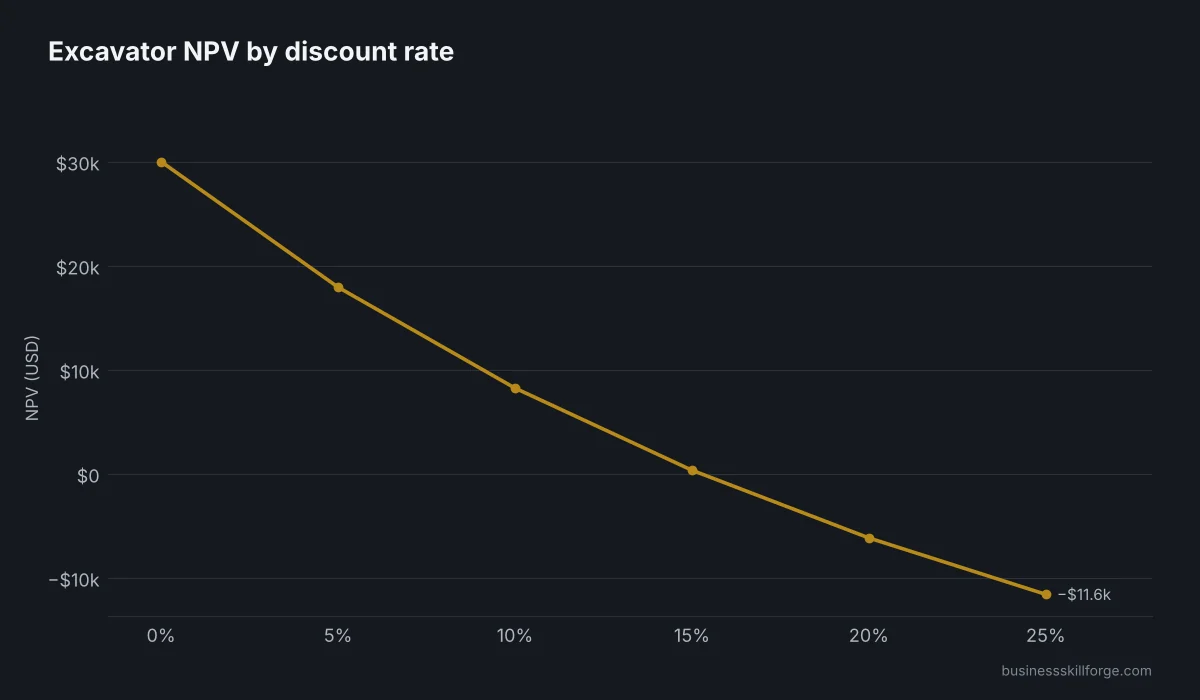
There’s no algebraic formula for IRR when there are more than a couple of cash flows. You find it by trial and error: pick a rate, calculate NPV, and adjust until NPV hits zero.
| Discount rate | NPV of the excavator |
|---|---|
| 0% | $30,000 |
| 5% | $17,931 |
| 10% | $8,234 |
| 15% | $339 |
| 20% | −$6,169 |
| 25% | −$11,593 |
NPV is still slightly positive at 15% and negative at 20%, so the IRR sits just above 15%. Narrowing it down gives 15.2%. If the owner’s hurdle rate is 10%, the excavator clears it comfortably, and the NPV at 10% is $8,234. If the owner treats it as a new-work project with a 15% hurdle, it only just scrapes over, and a small shortfall in extra jobs would sink it.
In practice nobody does this by hand. In Excel, put the six cash flows in A1:A6 and use =IRR(A1:A6). According to Microsoft’s IRR documentation, the function starts from a guess (10% if you don’t supply one), iterates until the result is accurate to 0.00001%, and returns a #NUM error if it can’t converge within 20 tries. The cash flows must include at least one negative and one positive value. Our IRR calculator does the same thing without a spreadsheet.
Trap 1: IRR ignores the size of the investment
IRR is a percentage, so it says nothing about how many dollars a project creates. When you have to choose between two projects, that matters.
Suppose the landscaping company can either:
- Project A: spend $10,000 on a trailer-mounted sprayer and get $15,000 back in a year.
- Project B: spend $100,000 on a second crew truck and equipment and get $130,000 back in a year.
| Project A | Project B | |
|---|---|---|
| Investment | $10,000 | $100,000 |
| Cash back in one year | $15,000 | $130,000 |
| IRR | 50% | 30% |
| NPV at 10% | $3,636 | $18,182 |
IRR says A. NPV says B, by five times as much value. If the company can only do one and has the money for either, B makes the owner $14,546 better off in present-value terms. A 50% return on a small amount is worth less than a 30% return on a large one.
The rule of thumb: use IRR to screen whether a single project is acceptable, and use NPV to choose between mutually exclusive projects.

Trap 2: IRR assumes you can reinvest at the IRR
The math behind IRR implicitly treats each cash flow the project throws off as if it earns the IRR until the end of the project. For the excavator, that means assuming each $18,000 can be reinvested at 15.2%. If the realistic reinvestment rate is closer to the company’s 10% hurdle rate, IRR overstates the return.
The fix is the modified internal rate of return (MIRR), which lets you set the reinvestment rate explicitly. Excel’s MIRR function takes the cash flows plus a finance rate and a reinvestment rate.
For the excavator at a 10% reinvestment rate:
- Grow each $18,000 forward to the end of year 5 at 10%. Year 1’s cash grows for four years, year 2’s for three, and so on: $18,000 × (1.1⁴ + 1.1³ + 1.1² + 1.1 + 1) = $109,891.80.
- Compare that ending value with the $60,000 invested five years earlier: ($109,891.80 ÷ $60,000)^(1/5) − 1 = 12.9%.
The excavator still clears a 10% hurdle, but its realistic return is closer to 12.9% than 15.2%. The gap gets much bigger for high-IRR projects, where the reinvestment assumption is least believable.
Trap 3: some projects have more than one IRR
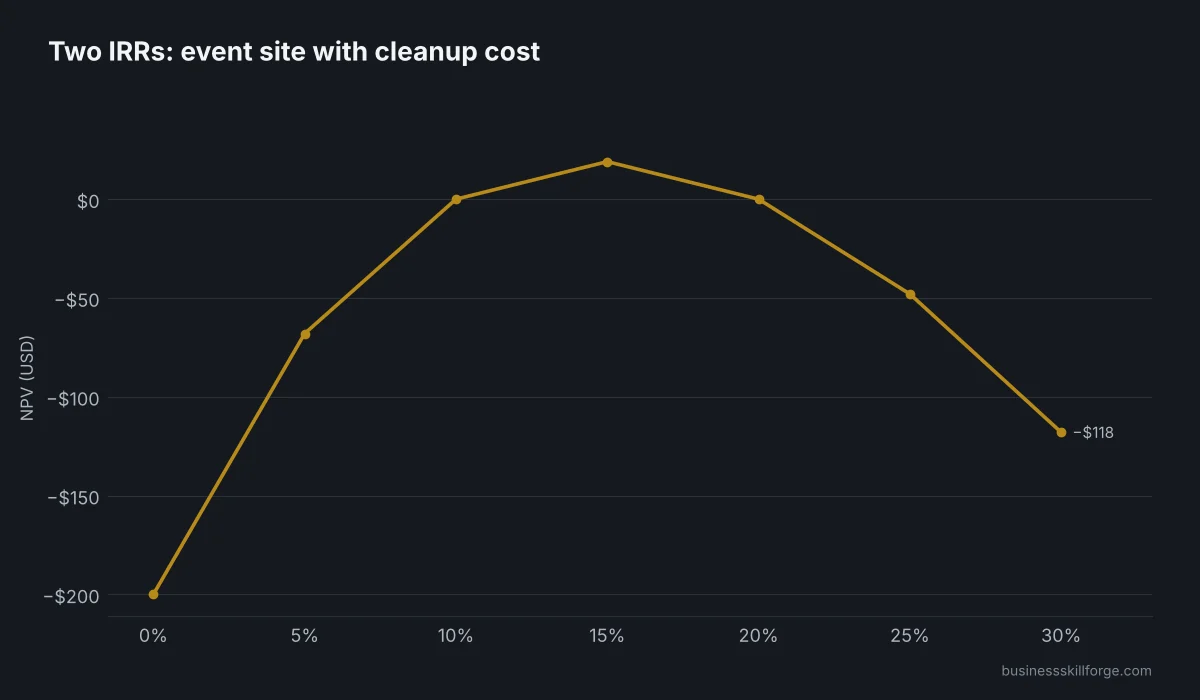
IRR works cleanly when cash flows change sign once: money out, then money in. When the sign flips more than once, there can be two or more rates that make NPV zero, and IRR stops being meaningful.
Take a company that spends $10,000 setting up a temporary event site, collects $23,000 from running it in year 1, and then has to pay $13,200 to restore the site in year 2. The cash flows are −$10,000, +$23,000, −$13,200.
| Discount rate | 0% | 5% | 10% | 15% | 20% | 25% | 30% |
|---|---|---|---|---|---|---|---|
| NPV | −$200 | −$68 | $0 | $19 | $0 | −$48 | −$118 |
NPV is zero at both 10% and 20%. Both are valid IRRs. Excel returns whichever one its iteration reaches from the starting guess, with no warning that another exists. The useful answer here comes from NPV at your actual hurdle rate: at 12%, NPV is about $13, which is essentially break-even on a $10,000 outlay.
Watch for this pattern any time a project has a big cost at the end: decommissioning, cleanup, a balloon loan repayment, or a major refit partway through.
Trap 4: high IRR on a short project isn’t a lot of money
IRR is an annualized rate, which flatters short projects. Lending $10,000 to a supplier for three months and getting $10,800 back is an 8% return per quarter, which annualizes to (1.08)⁴ − 1 = 36.0%. That’s more than double the excavator’s IRR.
But the supplier loan makes $800 once. The excavator makes $30,000 of undiscounted gain over five years. A 36% IRR only matters if you can keep finding similar three-month deals, back to back, all year. Before you celebrate a high IRR, ask how long the money is actually at work and what happens to it afterward. That’s an opportunity cost question, and IRR doesn’t answer it.
Trap 5: monthly cash flows give a monthly IRR
Excel’s IRR returns a rate per period. If your cash flows are monthly, the result is a monthly rate, and multiplying by 12 understates the annual equivalent.
Example: invest $12,000 and receive $1,100 a month for 12 months. =IRR() returns about 1.50% per month. Multiplying by 12 gives 18.0%, but the compounded annual rate is (1.015)¹² − 1 = 19.5%. When cash flows fall on irregular dates, use XIRR(values, dates), which Microsoft describes as returning the internal rate of return for a schedule of cash flows that is not necessarily periodic, discounted on a 365-day year. Our guide to Excel financial functions covers IRR, XIRR and MIRR side by side.
When IRR is the right tool
None of this means you should stop using IRR. It’s a good fit when:
- You’re deciding whether a single, conventional project (money out, then money in) is worth doing at all.
- You want to communicate a return to someone who thinks in percentages, such as a partner or lender.
- You’re comparing investments of similar size and similar length.
- You don’t know the exact discount rate, but you know the range. If the IRR is 25% and your hurdle is somewhere between 8% and 12%, you don’t need to settle the hurdle to make the decision.
For anything else, calculate NPV alongside it and let NPV decide when they disagree. The glossary has a short definition of IRR if you need one to share.
What to do next
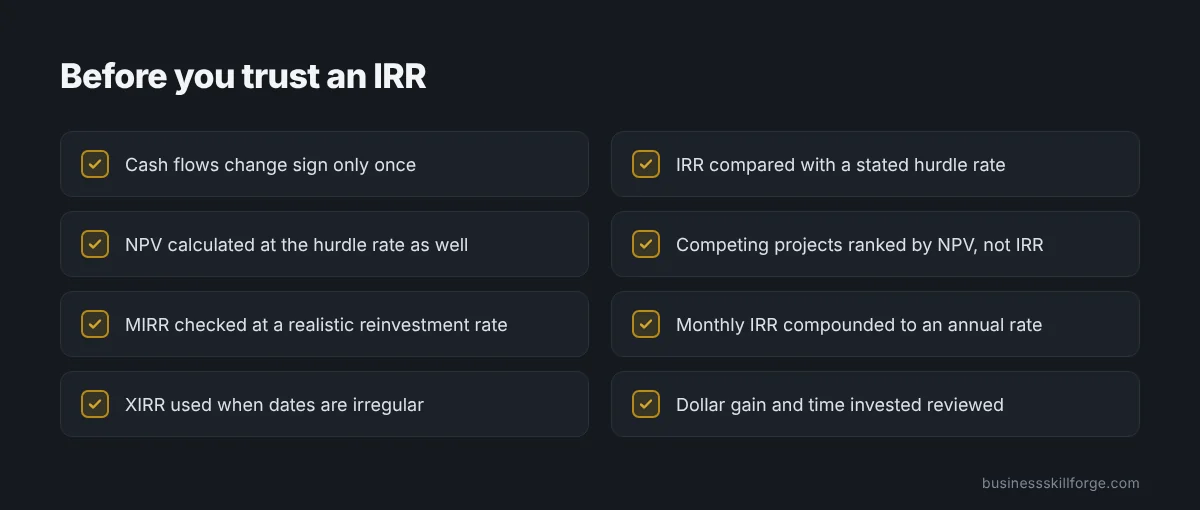
- Lay out the cash flows by period, starting with the investment as a negative number in period zero.
- Check the sign pattern. If it changes from negative to positive more than once, rely on NPV instead of IRR.
- Calculate IRR and NPV together, using your hurdle rate for NPV.
- Calculate MIRR with a realistic reinvestment rate if the IRR is well above your hurdle rate.
- Annualize correctly if your periods are months or quarters, or use XIRR with real dates.
Key takeaways
- The internal rate of return is the discount rate at which an investment’s NPV equals zero, expressed as an annual percentage.
- Accept a single conventional project if its IRR exceeds your hurdle rate, but choose between competing projects using NPV.
- IRR assumes cash can be reinvested at the IRR itself; MIRR with a realistic reinvestment rate gives a more conservative figure.
- Projects whose cash flows change sign more than once can have several IRRs, so use NPV for them instead.
- Short projects can show very high IRRs while creating little value, so look at the dollar gain and how long the money is invested.
Frequently asked questions
What is a good internal rate of return?
A good IRR is one that comfortably exceeds your hurdle rate, which is the minimum return you need given your cost of money and the project’s risk. For a small business funding equipment with a 9% loan, an IRR of 15% leaves room for error; an IRR of 10% doesn’t. There’s no universal target, because required returns depend on interest rates, risk and alternatives.
What is the difference between IRR and ROI?
ROI is total gain divided by the amount invested, with no adjustment for time. IRR is an annualized rate that accounts for when each cash flow arrives. A project that turns $60,000 into $90,000 has a 50% ROI whether it takes one year or five, but its IRR is 50% if the $90,000 comes back after one year and about 15% if it arrives as $18,000 a year for five years. IRR is better for comparing investments of different lengths.
Why does Excel's IRR return a #NUM error?
Excel’s IRR function searches for the answer by iteration, starting from a guess of 10% unless you provide one. If it can’t find a result accurate to 0.00001% within 20 tries, it returns a #NUM error. Check that your cash flows include at least one negative and one positive value, then try a different guess. Unusual cash flow patterns may have no IRR or several.
When should I use NPV instead of IRR?
Use NPV when choosing between competing projects, when projects differ a lot in size or length, and when cash flows change sign more than once. NPV measures value in dollars at your chosen discount rate and always has a single answer. IRR is fine for a quick yes or no on a single conventional project, but NPV should win whenever the two disagree.
What is MIRR and why use it?
MIRR, the modified internal rate of return, is a version of IRR that lets you choose the rate at which cash flows are reinvested, instead of assuming they earn the IRR itself. It gives a more realistic return for projects with high IRRs. For the $60,000 excavator example, IRR is 15.2% but MIRR at a 10% reinvestment rate is about 12.9%.
Sources
This article is general education, not tax, legal, accounting or investment advice. Rules and thresholds differ by country and change over time, so check the specifics for your situation. See our financial disclaimer.
Get practical finance & accounting tips in your inbox
Join US professionals getting our best guides, templates and tools. Free. Unsubscribe anytime.