How to Set Up a Chart of Accounts for a Small Business
October 26, 2026 · Aditya Gupta

A chart of accounts is the list of every account your business uses to record transactions, grouped into assets, liabilities, equity, revenue and expenses, usually with a number for each. To set one up, start from your accounting software’s template, delete what you don’t need, add accounts for your biggest costs and revenue streams, and match expense accounts to your tax return lines.
It sounds like admin, and it is. But the chart of accounts decides what your reports can tell you. Lump everything into a handful of accounts and you’ll never see which costs are growing. Create two hundred and nobody will categorize consistently. This guide shows a sensible middle ground, with a full sample for a small online shop.
What a chart of accounts is and why it matters
A chart of accounts is the organized list of accounts a business uses to classify its transactions. Each account collects one kind of activity: cash in a particular bank account, money owed by customers, rent, advertising, product sales. The full detailed record of every transaction posted to those accounts is the general ledger.
The chart is the skeleton your financial statements are built from. Asset, liability and equity accounts become the balance sheet. Revenue and expense accounts become the income statement. If an account doesn’t exist, the information can’t appear in a report, and if two kinds of cost share an account, you can’t separate them later without recategorizing transactions one by one.
The five account types and how to number them
Every account belongs to one of five types, and each type behaves the same way in double-entry bookkeeping (if you need a refresher, see our guide to debits and credits). A common convention is to give each type its own block of numbers:
| Number range | Account type | Appears on | Examples |
|---|---|---|---|
| 1000–1999 | Assets | Balance sheet | Checking account, accounts receivable, inventory, equipment |
| 2000–2999 | Liabilities | Balance sheet | Accounts payable, credit cards, sales tax payable, loans |
| 3000–3999 | Equity | Balance sheet | Owner’s capital, owner’s draws, retained earnings |
| 4000–4999 | Revenue | Income statement | Product sales, service fees, refunds (as a negative) |
| 5000–5999 | Cost of goods sold | Income statement | Product cost, freight in, packaging |
| 6000–7999 | Operating expenses | Income statement | Advertising, rent, software, wages, insurance |
| 8000–8999 | Other income and expense | Income statement | Interest income, interest expense, gains on asset sales |
Within each block, list balance sheet accounts roughly in order of liquidity (cash first, long-term assets last) and leave gaps between numbers. Numbering 1000, 1010, 1020 rather than 1000, 1001, 1002 means you can slot a new account in later without renumbering. Numbers are optional in most small-business software, but they keep reports in a predictable order and make it easier for an accountant to find things.
How to set up a chart of accounts in six steps
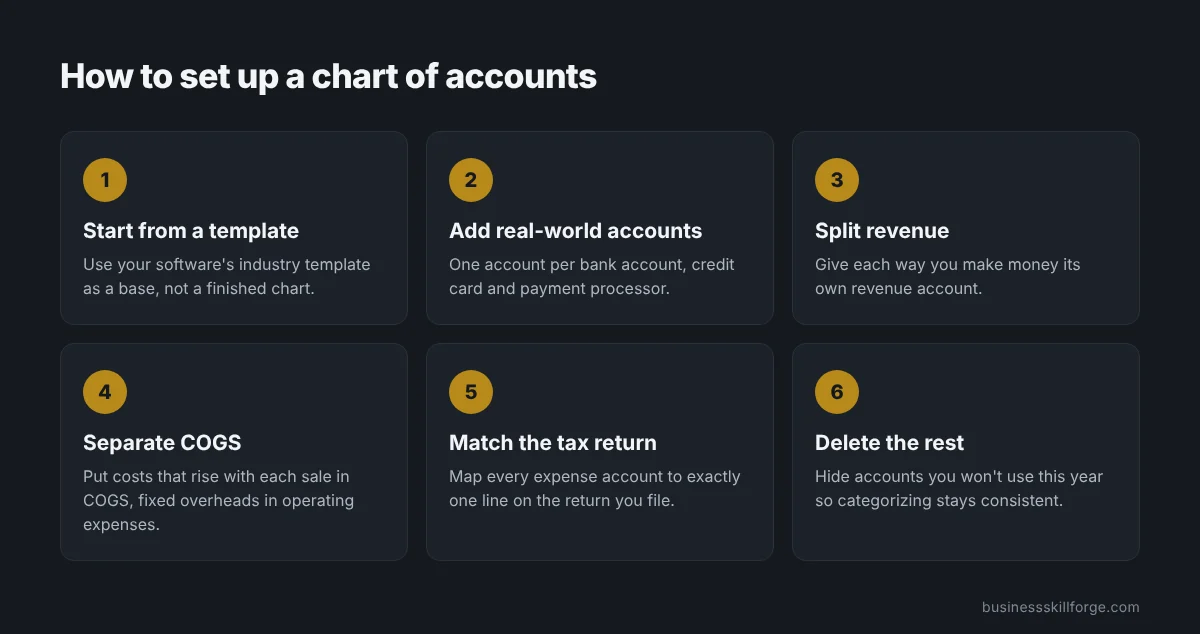
- Start from your software’s template. QuickBooks, Xero and similar tools create a default chart based on your industry. It’s a reasonable starting point but almost always too long in some places and too thin in others.
- Add every real-world account. One asset account for each bank account and each credit card (as a liability), plus a clearing account for each payment processor that pays you in batches.
- Split revenue by the way you make money. If you sell products and services, or wholesale and retail, give each its own revenue account. That’s what lets you see which one is growing.
- Separate cost of goods sold from overheads. Costs that rise with each sale (product cost, packaging, shipping to customers) go in COGS. Fixed running costs go in operating expenses. Without this split, you can’t calculate gross margin.
- Match expense accounts to your tax return. More on this below. It saves hours at year end.
- Delete or hide the rest. If you won’t use an account in the next year, remove it. Fewer choices mean more consistent categorizing.
Sample chart of accounts for a small business
Here’s a working chart for a small online shop selling home goods, with one part-time employee, a business credit card and a small equipment loan. It has 37 accounts, which is plenty.
| No. | Account | Type |
|---|---|---|
| 1000 | Business checking | Asset |
| 1010 | Business savings | Asset |
| 1050 | Payment processor clearing | Asset |
| 1100 | Accounts receivable | Asset |
| 1200 | Inventory | Asset |
| 1300 | Prepaid expenses | Asset |
| 1500 | Equipment | Asset |
| 1510 | Accumulated depreciation, equipment | Asset (contra) |
| 2000 | Accounts payable | Liability |
| 2100 | Business credit card | Liability |
| 2200 | Sales tax payable | Liability |
| 2300 | Payroll liabilities | Liability |
| 2400 | Gift card liability | Liability |
| 2700 | Equipment loan | Liability |
| 3000 | Owner’s capital | Equity |
| 3100 | Owner’s draws | Equity |
| 3900 | Retained earnings | Equity |
| 4000 | Product sales | Revenue |
| 4100 | Shipping charged to customers | Revenue |
| 4900 | Refunds and discounts | Revenue (contra) |
| 5000 | Product cost | COGS |
| 5100 | Freight in | COGS |
| 5200 | Packaging | COGS |
| 5300 | Outbound shipping | COGS |
| 5400 | Payment processing fees | COGS |
| 6000 | Advertising | Operating expense |
| 6100 | Software subscriptions | Operating expense |
| 6200 | Contract labor | Operating expense |
| 6300 | Wages | Operating expense |
| 6400 | Rent | Operating expense |
| 6500 | Insurance | Operating expense |
| 6600 | Legal and professional fees | Operating expense |
| 6700 | Office supplies | Operating expense |
| 6800 | Taxes and licenses | Operating expense |
| 6900 | Depreciation | Operating expense |
| 7900 | Miscellaneous | Operating expense |
| 8100 | Interest expense | Other expense |
A few choices worth explaining. The payment processor clearing account holds sales until the processor pays out, net of fees, so you can match each payout to the sales behind it. Gift card liability exists because a gift card sold isn’t revenue until it’s redeemed. And payment processing fees sit in COGS here because, for an online shop, they rise with every order. Some businesses put them in operating expenses instead. Either is defensible; what matters is choosing one and sticking with it.
Why account structure changes what you see: a worked example
Say the same shop’s first-year books, set up from a generic template, show net revenue of $240,000, product cost of $108,000 and an “Other expenses” account of $38,400. Gross margin looks like ($240,000 − $108,000) ÷ $240,000 = 55.0%.
Splitting “Other expenses” into proper accounts shows what was really in it:
| Cost | Amount | Belongs in |
|---|---|---|
| Outbound shipping | $14,200 | COGS |
| Payment processing fees | $8,600 | COGS |
| Software subscriptions | $6,100 | Operating expense |
| Packaging | $5,300 | COGS |
| Genuinely miscellaneous | $4,200 | Operating expense |
| Total | $38,400 |
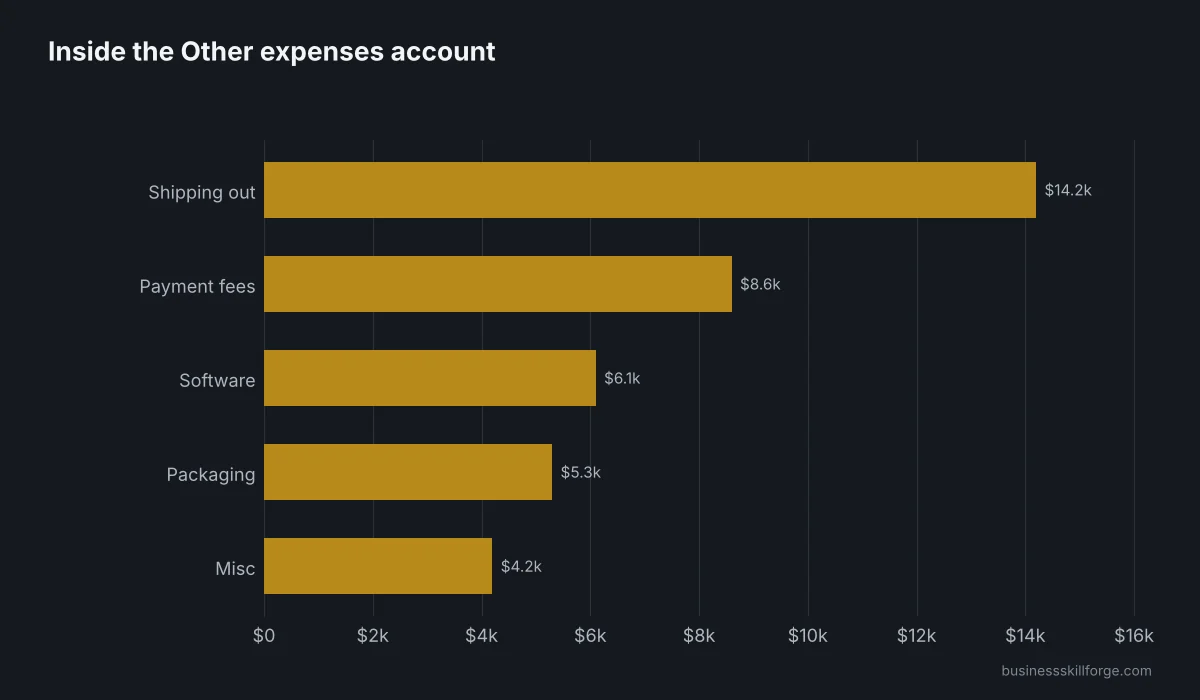
Move the $28,100 of shipping, processing and packaging into COGS and gross margin becomes ($240,000 − $136,100) ÷ $240,000 = 43.3%. Nothing about the business changed. But the owner now sees that each sale keeps about 43 cents, not 55, which matters a great deal when deciding whether free shipping or a 20% discount code is affordable. Our guide on how to read an income statement covers what to do with margins once you can see them.
Match expense accounts to your tax return
Your tax return already has a list of expense categories, so it makes sense to build your chart around it. For a US sole proprietor, the expense lines on Schedule C (Form 1040) include advertising, car and truck expenses, commissions and fees, contract labor, depreciation and section 179, insurance, interest, legal and professional services, office expense, rent or lease, repairs and maintenance, supplies, taxes and licenses, travel, deductible meals, utilities and wages.
You don’t need one account per line, and you can have more detail than the form (three software accounts that all roll up into one line is fine). The goal is that every expense account maps cleanly to exactly one line, so year-end preparation is a matter of adding up, not re-sorting.
The categories differ elsewhere. Canadian sole proprietors report on Form T2125, UK sole traders use the self-employment pages of their Self Assessment return, and Australian businesses have their own return labels. Corporations and partnerships file different forms again. Check the one you actually file.
How many accounts does a small business need?
Fewer than you think. The test for every expense account is simple: would you make a different decision if you knew this number separately? Advertising, yes. A separate account for printer ink, probably not.
Use your software’s other tools before adding accounts. Classes, locations, tracking categories or tags let you slice the same expense account by project, store or product line. Customer and vendor records already track who you paid. Adding “Advertising, Facebook” and “Advertising, Google” as separate accounts is usually worse than one Advertising account with a tag for the channel.
Common chart of accounts mistakes
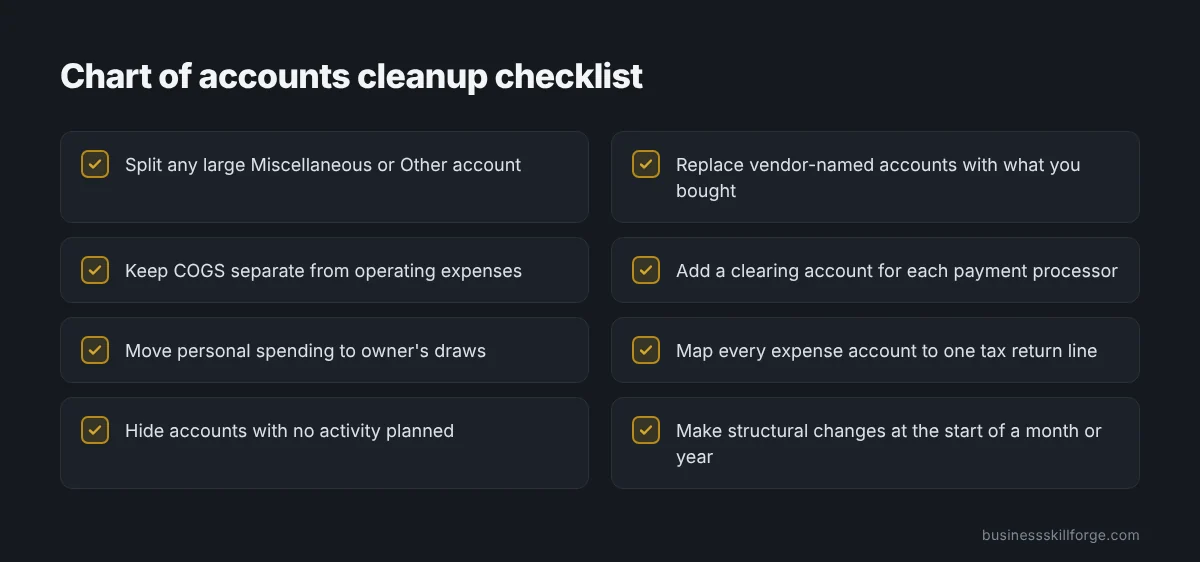
- A huge miscellaneous account. If “Miscellaneous” or “Other” is more than a small share of your expenses, it’s hiding something. Split it.
- Accounts for individual vendors. “Amazon” isn’t an account; it’s a supplier. Classify what you bought, not where.
- Mixing COGS and overheads. As the example shows, this can overstate gross margin by more than ten points.
- No clearing account for payment processors. Recording net payouts as revenue understates sales and hides fees.
- Personal spending in expense accounts. Owner’s personal costs paid from the business account belong in owner’s draws.
- Renaming accounts mid-year. Changing what an account means breaks comparisons. Create a new account and stop using the old one at a clean date, ideally the start of a year.
What to do next
Export your current chart of accounts and your profit and loss for the last twelve months. Highlight any account with a zero balance (candidates to hide) and any account over a few percent of revenue that mixes different kinds of cost (candidates to split). Then check each expense account maps to one tax return line.
Make changes at a clean date, ideally the start of a month or year, and write a one-page note of what goes where so anyone categorizing transactions follows the same rules. Our guide on how to categorize business expenses covers the day-to-day decisions, and our free finance templates include starting points for small-business bookkeeping.
Key takeaways
- A chart of accounts is the organized list of accounts a business uses to classify every transaction, and it determines what your reports can show.
- Number accounts in blocks by type, such as 1000s for assets and 4000s for revenue, and leave gaps for future accounts.
- Separating cost of goods sold from operating expenses is what makes gross margin visible.
- Map each expense account to exactly one line on the tax return you file.
- Use classes, locations or tags for extra detail instead of creating more accounts.
Frequently asked questions
What is the difference between a chart of accounts and a general ledger?
The chart of accounts is the list of accounts, like a table of contents. The general ledger is the full record of every transaction posted to those accounts, with dates, amounts and running balances. You set up the chart once and adjust it occasionally; the ledger grows every time you record a transaction. Your financial statements are summaries of the ledger balances, organized by the chart.
Do I have to number my accounts?
No. Most small-business accounting software works fine with names only, and some hide numbers by default. Numbers help once you have more than a few dozen accounts, because they keep reports in a predictable order, make it obvious what type an account is, and make it easier for an accountant or bookkeeper to find things. If you use them, leave gaps between numbers for future accounts.
How many accounts should a small business have?
Enough to separate the numbers you’d act on, and no more. A small service business may need only a couple of dozen, while a product business with inventory and payroll needs more. The sample in this guide uses 37 for an online shop. If you find yourself wanting dozens of expense accounts, consider using classes or tags for the extra detail instead.
Can I change my chart of accounts later?
Yes, but do it carefully. Adding new accounts is easy at any time. Renaming or merging accounts mid-year can make this year’s numbers impossible to compare with last year’s, and deleting accounts with transactions in them may not be allowed. The cleanest approach is to make structural changes at the start of a month or financial year and keep a note of what changed.
Should payment processing fees be cost of goods sold or an operating expense?
Either is acceptable, as long as you’re consistent. Fees that rise with every sale behave like a direct cost, so many online sellers put them in cost of goods sold to get a more honest gross margin. Others treat them as an operating expense alongside bank charges. Pick one, record it in your bookkeeping notes, and apply it the same way every month.
Sources
- IRS Schedule C (Form 1040), Profit or Loss From Business
- Canada Revenue Agency: Form T2125, Statement of Business or Professional Activities
This article is general education, not tax, legal, accounting or investment advice. Rules and thresholds differ by country and change over time, so check the specifics for your situation. See our financial disclaimer.
Get practical finance & accounting tips in your inbox
Join US professionals getting our best guides, templates and tools. Free. Unsubscribe anytime.