How to Reconcile Stripe Payouts in Your Books
October 29, 2026 · Aditya Gupta

To reconcile Stripe payouts, record each payout as gross sales less fees, refunds and disputes, using a Stripe clearing account that works like a second bank account. Stripe’s Payout reconciliation report breaks every automatic payout into those pieces. At month-end, the clearing account in your books should equal the ending balance on Stripe’s Balance summary report.
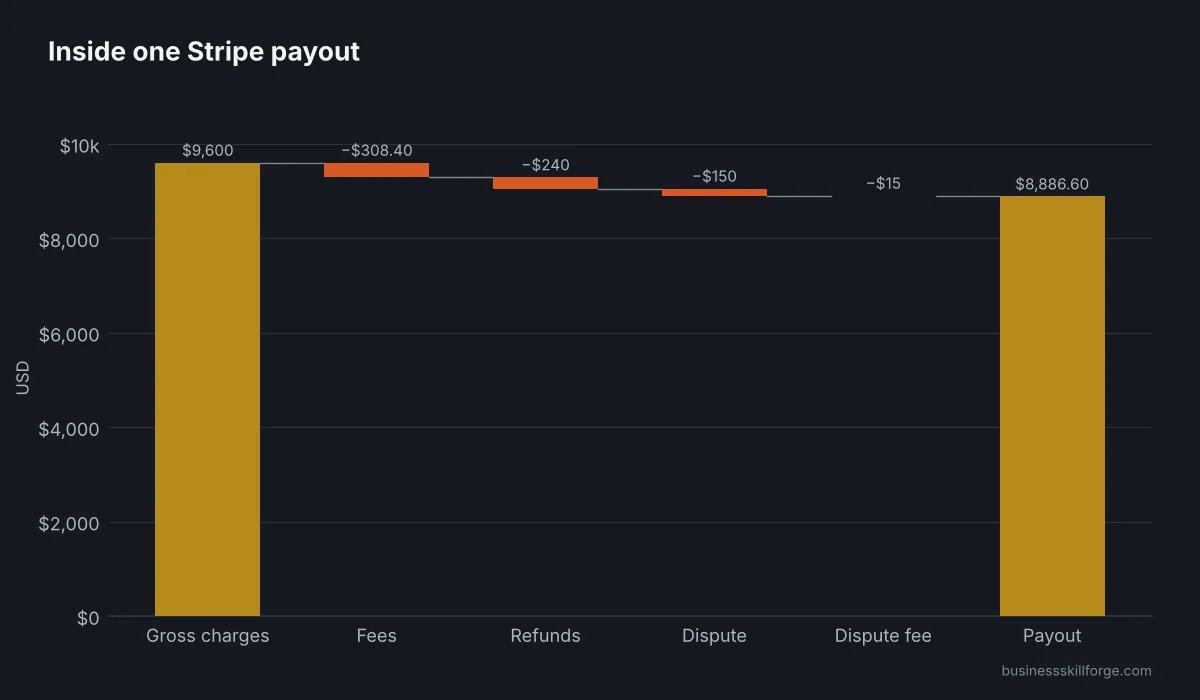
The problem this solves is simple: a $8,886.60 deposit in the bank tells you nothing about the $9,600 of sales, $308.40 of fees and $405 of refunds and disputes inside it. This guide shows how to set up the books, which Stripe report to pull, a full worked payout with journal entries, and how to handle refunds, disputes and timing differences.
Why Stripe deposits never match your sales
Stripe doesn’t send you each customer’s payment. It collects payments into your Stripe balance, deducts its fees from each transaction, takes out refunds and disputes as they happen, and then sends what’s left to your bank as a payout. A payout is a transfer of funds from your Stripe balance to your bank account, and it’s almost always a net figure covering many transactions.
So if you code each bank deposit to sales, three things go wrong. Revenue is understated by the fees, refunds and disputes netted out of it. Your processing costs never appear as an expense. And the timing is off, because a sale made on the 30th might not reach your bank until the following month. The same issue shows up with any processor, which is why recording net deposits as revenue features in our list of common bookkeeping mistakes.
How Stripe payouts work: pending, available, paid out
Every transaction moves through your Stripe balance in stages. When a payment is captured, Stripe creates a balance transaction with a gross amount, a fee and a net amount. The net amount sits in your pending balance until its “available on” date, then moves to your available balance. Payouts are paid from the available balance.
How fast funds become available is set by your settlement timing, which Stripe expresses as “T+X” days and which varies by country. Your payout schedule is separate: it decides when payouts are sent. Stripe’s payout documentation describes the options as manual, daily, weekly or monthly payouts, and notes that choosing a schedule doesn’t change how long pending funds take to become available.
Two details matter for bookkeeping:
- Automatic payouts are batches Stripe can trace. With daily, weekly or monthly payouts, Stripe knows which transactions went into each payout and can report on them.
- Manual and Instant Payouts aren’t. When you choose the timing and amount, Stripe can’t tie a payout to specific transactions. You reconcile the Stripe balance as a whole instead, the way you’d reconcile a bank account.
Set up a Stripe clearing account
A clearing account is a temporary holding account that money passes through on its way somewhere else. For Stripe, create an asset account called something like “Stripe clearing” in your chart of accounts, under current assets next to your bank accounts. Its balance represents money Stripe is holding for you.
Every Stripe event becomes a journal entry through that account:
| Stripe event | Debit | Credit |
|---|---|---|
| Customer payment (charge) | Stripe clearing | Sales revenue (or accounts receivable for invoices) |
| Stripe processing fee | Merchant fees expense | Stripe clearing |
| Refund to a customer | Sales refunds (contra-revenue) | Stripe clearing |
| Dispute opened | Disputed payments | Stripe clearing |
| Dispute fee | Merchant fees expense | Stripe clearing |
| Payout arrives in bank | Business checking | Stripe clearing |
If you invoice customers through Stripe and keep accrual books, the invoice already recorded the revenue. The payment then credits accounts receivable, not sales, or you’ll count the revenue twice.
Which Stripe report should you use?
Stripe has two reports built for this job, and the right one depends on how you’re paid out.
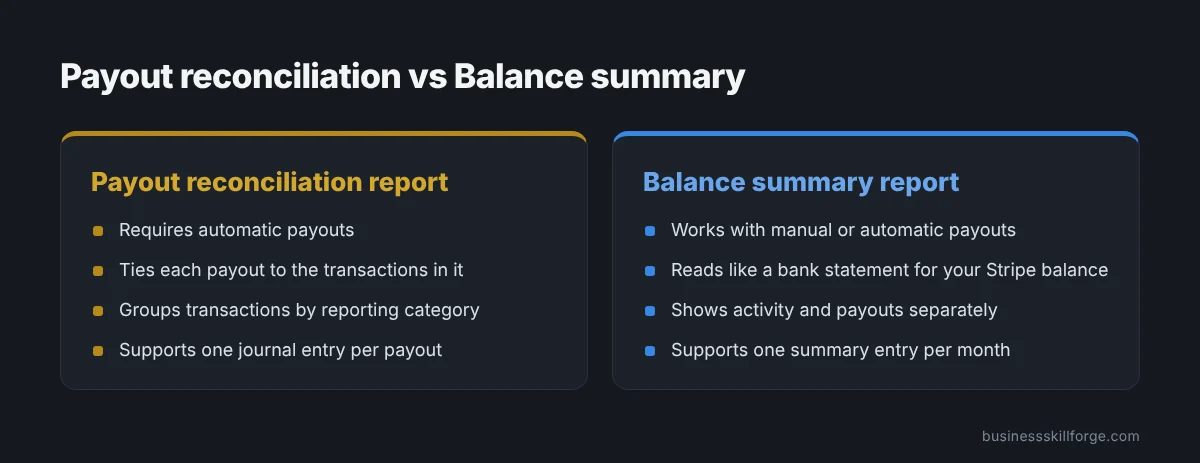
| Payout reconciliation report | Balance summary report | |
|---|---|---|
| Best for | Automatic payouts | Manual payouts, or reconciling the balance like a bank account |
| Main sections | Balance summary, Payout reconciliation, Failed payouts (if any), Ending balance reconciliation | Balance summary, Balance change from activity, Payouts |
| Ties payouts to transactions | Yes, grouped by reporting category | No, it lists all activity and payouts in the period |
| Use it to | Record one journal entry per payout | Record one summary entry per month |
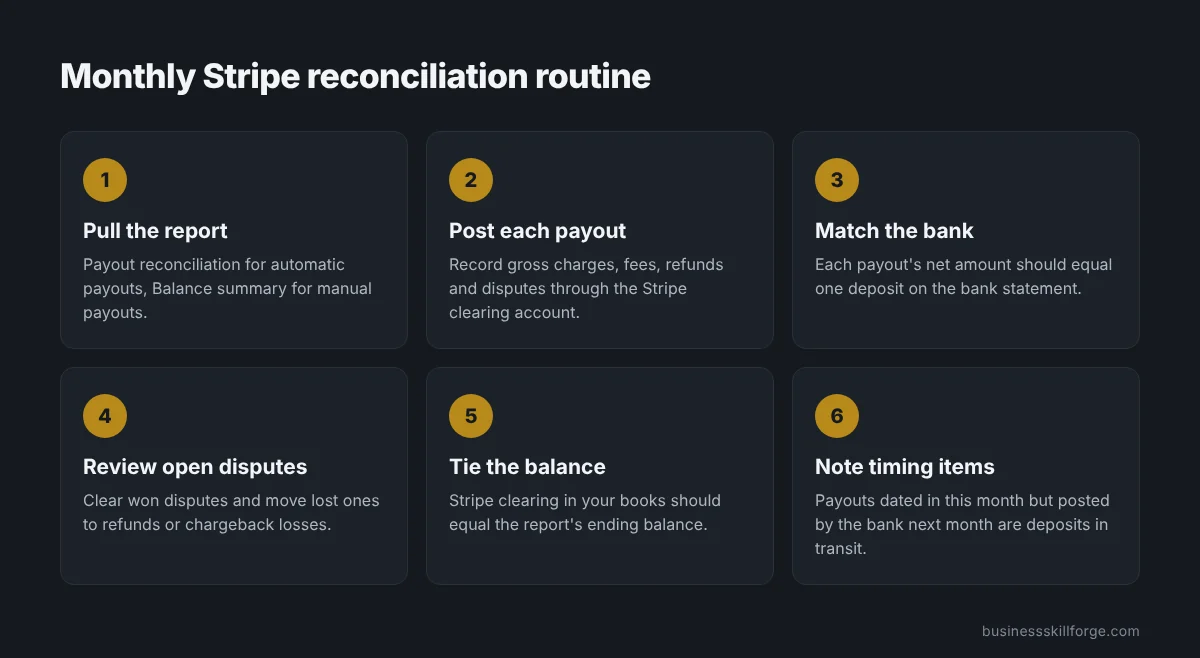
Stripe’s own documentation says the Payout reconciliation report is only available with automatic payouts enabled and points manual-payout users to the Balance summary report, which it describes as working like a bank statement. Both reports offer a Summary download (the totals) and an Itemized download (every transaction behind them).
How to record a Stripe payout: a worked example
A small online course business is on weekly automatic payouts. One Monday, $8,886.60 lands in its bank account. In the Payout reconciliation section of the report, that payout breaks down by reporting category like this (illustrative figures; your fees depend on your pricing and payment methods):
| Category | Count | Gross | Fee | Net |
|---|---|---|---|---|
| Charges | 48 | $9,600.00 | $308.40 | $9,291.60 |
| Refunds | 2 | ($240.00) | $0.00 | ($240.00) |
| Disputes | 1 | ($150.00) | $15.00 | ($165.00) |
| Payout | $8,886.60 |
Notice the refunds carry no fee credit. Stripe states that processing fees from the original charge aren’t returned when you refund, so the $308.40 stays as an expense even though $240 went back to customers.
The journal entry for this payout, if you post one entry per payout:
| Account | Debit | Credit |
|---|---|---|
| Business checking | $8,886.60 | |
| Merchant fees expense ($308.40 + $15.00) | $323.40 | |
| Sales refunds | $240.00 | |
| Disputed payments | $150.00 | |
| Sales revenue | $9,600.00 |
Debits total $9,600 and credits total $9,600. Sales are recorded at the full amount customers paid, the fees are visible, and the bank line matches the deposit to the cent. Strictly, the sales belong in the days they happened, not the payout date. If a payout straddles month-end, either record charges daily through the clearing account (some accounting integrations post activity this way) or split the entry by date using the Itemized download.
Refunds, disputes and negative balances
Refunds
Refunds come out of your available Stripe balance. Record them to a sales refunds account rather than reducing sales directly, so you can see how much revenue you give back each month. Stripe’s refund documentation notes that if your available balance doesn’t cover a card refund, the refund is held as pending until the balance is sufficient.
Disputes
A dispute (often called a chargeback) is when a cardholder asks their bank to reverse a payment. According to Stripe’s guide to how disputes work, Stripe debits the disputed amount plus a dispute fee from your Stripe balance when the dispute opens. If you win, the disputed amount comes back. The fee for receiving a dispute generally doesn’t (Stripe notes exceptions for some countries and contracts).
Book the disputed $150 to a “disputed payments” account while the case is open. If you win, a dispute reversal brings the $150 back through the clearing account and you clear the balance. If you lose, move it to sales refunds or a chargeback losses expense, depending on your chart of accounts.
Negative balances
If refunds and disputes exceed incoming payments, your Stripe balance goes negative. Stripe’s payout documentation explains that if no further payments cover the shortfall, Stripe creates a payout that debits your bank account. Record that as a debit to Stripe clearing and a credit to checking: the reverse of a normal payout.
Month-end: tie the clearing account to your Stripe balance
The payout-by-payout entries handle the bank side. The month-end check proves nothing was missed on the Stripe side. Pull the Balance summary report for the month and compare its ending balance with your Stripe clearing account.
| Balance summary line | Amount |
|---|---|
| Starting balance (1st of month) | $3,120.00 |
| Activity (charges, refunds, disputes, fees) | $38,450.00 |
| Total payouts | ($36,900.00) |
| Ending balance (last day of month) | $4,670.00 |
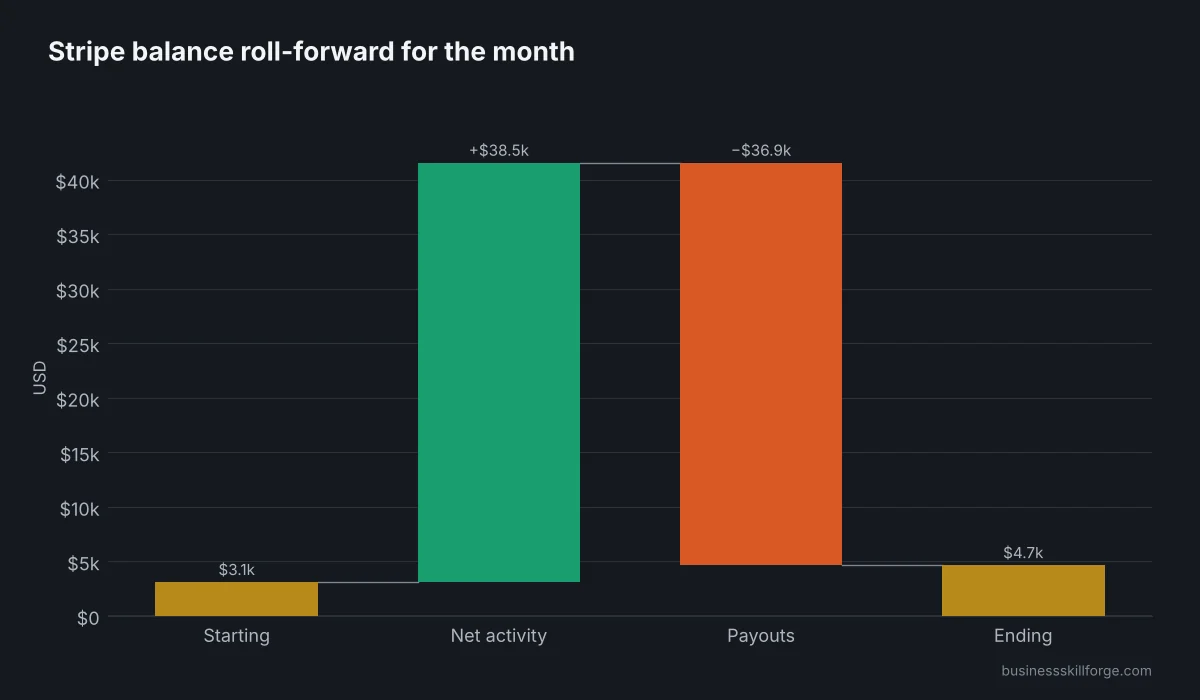
If your clearing account shows $4,670.00 at month-end, you’re done. That $4,670 isn’t an error. It’s sales Stripe is still holding (pending or available but not yet paid out), and it belongs on your balance sheet as a current asset. If the two numbers differ, the usual causes are a payout recorded on the wrong date, a refund or dispute posted straight to the bank, or a charge entered twice (once from an invoice, once from the payout).
One timing trap: Stripe’s reports group payouts by their estimated arrival date, not the date your bank posts the deposit. A payout Stripe dated the 31st that your bank shows on the 1st is a deposit in transit. List it as a reconciling item on your bank reconciliation rather than changing either record.
Common Stripe reconciliation mistakes
- Coding payouts to sales. Sales and fees both end up understated, and revenue won’t agree with Stripe’s gross figures.
- Counting invoice revenue twice. The invoice records revenue, then the payout records it again. Payments against invoices should clear receivables.
- Skipping the clearing account. Without it, there’s nowhere to hold money Stripe owes you at month-end, so the month’s revenue and the bank never quite agree.
- Ignoring failed payouts. A failed payout returns to your Stripe balance and is usually retried later. Recording the first attempt as cash received overstates the bank.
- Mixing currencies. Stripe reports transactions in your settlement currency after conversion. If you sell in several currencies, reconcile in the currency that reaches your bank.
What to do next
Create the Stripe clearing account today if you don’t have one. Then pick last month and do the full routine once by hand: download the Payout reconciliation report (or the Balance summary report if you’re on manual payouts), post one entry per payout, and compare the clearing account with Stripe’s ending balance. Doing it manually once makes it obvious when an integration later posts something oddly.
If you export Stripe’s itemized CSVs into a spreadsheet to build those entries, our guide to cleaning bank and accounting exports in Excel covers the date, text and number fixes you’ll likely need.
Key takeaways
- Treat Stripe as a second bank account: run every charge, fee, refund, dispute and payout through a Stripe clearing account.
- Use the Payout reconciliation report for automatic payouts and the Balance summary report for manual payouts or a balance-level check.
- Record payouts as gross sales less fees, refunds and disputes, so revenue and processing costs both show at their real amounts.
- Stripe keeps its processing fees on refunded payments and debits a dispute fee when a dispute opens, so both stay as expenses.
- At month-end, the clearing account should equal Stripe’s ending balance; any remaining difference is an error to trace, not a plug to post.
Frequently asked questions
Why doesn't my Stripe payout match my sales?
A payout is net of everything that happened in your Stripe balance: processing fees, refunds, disputes and dispute fees are deducted before the money is sent. Payouts also lag sales because funds must become available under your settlement timing before they’re paid out. Record gross sales and each deduction separately so your sales figure matches Stripe’s gross amounts.
What is a Stripe clearing account?
It’s a current asset account in your books that represents money Stripe is holding for you. Charges increase it, while fees, refunds, disputes and payouts reduce it. At month-end, its balance should equal the ending balance on Stripe’s Balance summary report. Any remaining balance is sales Stripe hasn’t paid out yet, not an error.
Which Stripe report do I use to reconcile payouts?
If you use automatic payouts, use the Payout reconciliation report, which breaks each payout into the transactions it contains, grouped by reporting category. If you use manual payouts, or want to reconcile Stripe like a bank account, use the Balance summary report. Both let you download a summary or an itemized CSV of every transaction.
Does Stripe refund its fees when I refund a customer?
Stripe’s support documentation says processing, Connect and currency conversion fees from the original charge are not returned on refunds. In your books, that means the original fee stays in merchant fees expense, and the refund itself is recorded to a sales refunds or returns account for the amount you gave back to the customer.
How do I record a Stripe dispute in my books?
When the dispute opens, Stripe debits the disputed amount and a dispute fee from your balance. Credit Stripe clearing, debit a disputed payments account for the amount and merchant fees for the fee. If you win, reverse the disputed amount back into clearing. If you lose, move it to refunds or a chargeback losses expense.
Sources
- Stripe Docs: Receive payouts
- Stripe Docs: Payout reconciliation report
- Stripe Docs: Balance summary report
- Stripe Support: Understanding fees for refunded payments
- Stripe Docs: How disputes work
- Stripe Docs: Refund and cancel payments
This article is general education, not tax, legal, accounting or investment advice. Rules and thresholds differ by country and change over time, so check the specifics for your situation. See our financial disclaimer.
Get practical finance & accounting tips in your inbox
Join US professionals getting our best guides, templates and tools. Free. Unsubscribe anytime.